Pump Bottle Mockup for Branding
Presenting a product effectively is often just as important as the product itself. Whether you are launching a new skincare line, formulating a custom hair care solution, or designing packaging for a cleaning product, visual appeal drives consumer interest. This is where a high-quality Pump Bottle Mockup becomes an indispensable tool. It allows creators and businesses to showcase their label designs in a realistic, three-dimensional context without the need for expensive physical prototypes.
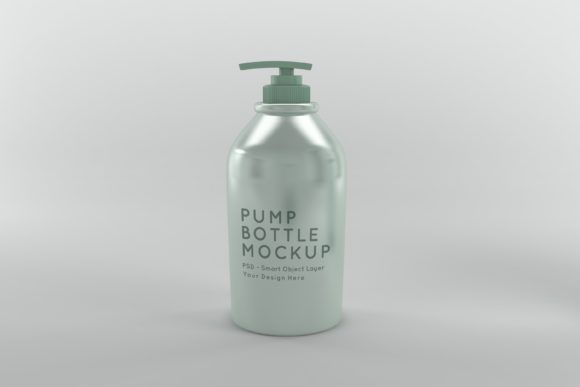
The Pump Bottle Mockup The Bottle Label Mockup is specifically designed for branding projects and product presentations. Unlike standard two-dimensional templates, this asset features a 3D realistic render that adds depth and authenticity to your work. By using this mockup, you can transform flat artwork into a tangible-looking product, helping potential customers visualize the final item on a shelf or in their hands.
Why Choose a Realistic 3D Render?
In the digital age, first impressions happen online. When a customer visits your website or scrolls through social media, they rely heavily on visuals to judge quality. A flat image of a label often fails to convey texture, volume, or material finish. A Pump Bottle Mockup solves this problem by providing a lifelike representation.
This particular mockup stands apart from other bottle mockups that are typically basic 3D renders because it focuses on realism and detail. The lighting, shadows, and reflections are calculated to mimic real-world photography. This level of detail helps build trust with your audience. It signals professionalism and attention to detail, which are crucial factors for small business owners and entrepreneurs looking to establish credibility in competitive markets.
Key Features and Specifications
Understanding the technical aspects of the mockup ensures you get the best results. Here is what makes this bundle particularly valuable for designers and marketers:
- High Resolution: With dimensions of 5000 x 3333px, the file offers exceptional clarity. This high resolution ensures that your presentation looks crisp on large monitors, print materials, and social media feeds alike.
- Minimalistic Background: The scene features a clean, minimalistic background color. This design choice keeps the focus squarely on your product, preventing distractions and making the artwork look more outstanding.
- Smart Object Technology: The file is a layered Photoshop PSD format that utilizes Smart Objects. This means you can easily place your artwork onto the bottle without worrying about distorting the perspective or losing quality.
- Reusability: Once purchased, you can reuse the mockup many times. This saves money in the long term compared to hiring a photographer for every new product variation.
How It Works: Simplicity Meets Professionalism
One of the biggest barriers to creating professional marketing materials is the learning curve associated with complex software. However, this Pump Bottle Mockup is simple to use, even for beginners. You do not need advanced graphic design skills to achieve stunning results.
The process relies on the power of Adobe Photoshop’s Smart Object feature. When you open the included PSD file, you will see a layer structure that guides you through the insertion of your design. To apply your label:
- Open the main PSD file in Photoshop.
- Locate the Smart Object layer labeled for the bottle body or label area.
- Double-click the thumbnail of that layer. This opens a new window containing your artwork canvas.
- Paste or drag your label design into this window, align it carefully, and save the changes (Ctrl+S or Cmd+S).
- Close the window, and your design will automatically wrap around the 3D shape of the bottle with correct lighting and shadows.
This workflow saves significant time compared to creating a 3D scene from scratch. It also eliminates the risk of errors that can occur when manually manipulating layers in complex compositions.
Practical Applications for Various Users
The versatility of this mockup makes it suitable for a wide range of audiences. Here are some realistic scenarios where this tool adds immediate value:
For Small Business Owners and Entrepreneurs
If you are launching a private label brand, you likely need to pitch your concept to investors or suppliers. A realistic mockup allows you to present your vision clearly. Instead of describing what the bottle will look like, you show them. This clarity can accelerate decision-making and secure funding faster.
For Marketers and Bloggers
Content creators need fresh, high-quality images to maintain engagement on blogs and social media platforms. Using this Pump Bottle Mockup allows you to create multiple variations of the same product for different campaigns. You can test different color schemes or typography options by simply swapping out the Smart Object layer, giving you data-driven insights into what resonates with your audience.
For Educators and Students
In design courses, students often struggle to bridge the gap between digital design and physical production. This mockup serves as an excellent educational tool, demonstrating how 2D graphics translate into 3D packaging. It helps learners understand the importance of bleed areas, safe zones, and material finishes.
What Is Included in the Bundle?
To ensure you have everything needed for a seamless experience, the bundle includes specific files tailored for different workflows:
- 1 PSD Photoshop Format: The editable source file that allows for full customization via Smart Objects. This is your primary tool for integrating your unique artwork.
- 1 JPEG High Resolution Image: A pre-rendered version at 5000 x 3333px. This is useful if you need a quick preview or if you are working in a software that does not support PSD files.
Having both formats provides flexibility. You can use the JPEG for quick social media posts or email newsletters, while reserving the PSD for detailed client presentations or high-stakes marketing materials.
Important Considerations Before Use
While this mockup is user-friendly, there are a few things to keep in mind to get the best results. First, ensure your label design is vector-based or has a high enough resolution before importing it into the Smart Object. Low-resolution images may appear pixelated when scaled up to fit the bottle’s surface. Second, pay attention to the curvature of the bottle in the mockup. Avoid placing critical text or logos too close to the edges where the label wraps around, as these areas may become distorted or obscured in the final render.
Additionally, consider the context of your presentation. Since the background is minimalistic, you have the freedom to composite the bottle into various environments later if needed. However, for most branding purposes, the standalone render provided by the mockup is sufficient to convey a premium feel.
Conclusion
Investing in a high-quality Pump Bottle Mockup is a smart move for anyone involved in product design or marketing. It bridges the gap between concept and reality, allowing you to showcase your work with confidence. By saving time and reducing costs, it empowers you to focus on what matters most: creating great products and connecting with your customers.
If you have any questions about how to use the Smart Objects or need assistance with the file setup, feel free to ask. The support team is happy to assist you at any time. Do not hesitate to contact them if you require further information. Your success in presenting your brand professionally starts with the right tools, and this mockup is designed to help you achieve exactly that.