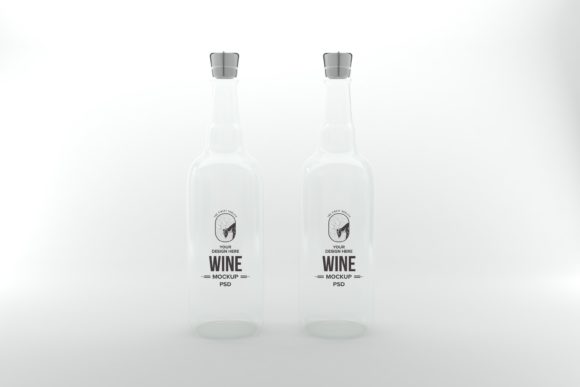
Elevating Brand Identity with the Wine Drink Bottle Mockup
In the competitive landscape of beverage marketing, visual presentation is not merely an aesthetic choice; it is a critical component of consumer trust and brand recognition. For designers, entrepreneurs, and marketers, the ability to present a product concept realistically before production begins can mean the difference between a successful launch and a costly revision cycle. This is where high-fidelity digital assets become indispensable tools in the creative workflow. Among these tools, the Wine Drink Bottle Mockup stands out as a versatile solution for showcasing label designs, branding concepts, and packaging innovations.
This article explores the practical applications, technical advantages, and strategic benefits of utilizing a 3D realistic rendered bottle mockup. By understanding how these digital assets function and integrate into professional workflows, creators can streamline their design process, reduce overhead costs, and deliver more compelling presentations to clients or stakeholders.
The Shift from Traditional Rendering to Smart Object Workflows
Historically, creating photorealistic product images required complex 3D modeling software, advanced lighting setups, and significant rendering time. While 3D renders offer unparalleled control over angles and textures, they often lack the flexibility needed for rapid iteration. A designer might spend hours adjusting a light source only to realize that the label text needs to be changed, requiring a complete re-render.
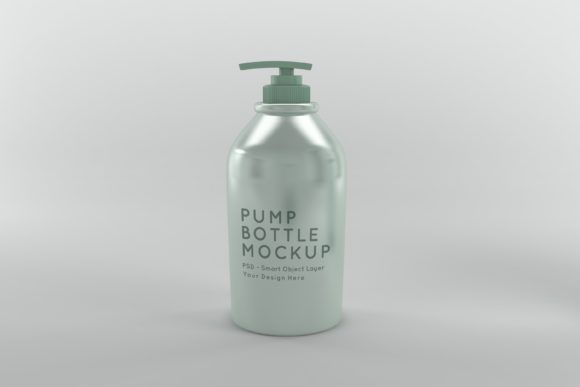
The modern approach leverages layered Photoshop files combined with smart object technology. The Wine Drink Bottle Mockup described here represents this evolution. It is not just a static image but a dynamic template. By using a PSD (Photoshop Document) format, designers can overlay their artwork directly onto the bottle surface. This method preserves the realism of a 3D render—capturing reflections, shadows, and glass transparency—while allowing for instant updates to the label design. This hybrid approach offers the best of both worlds: the visual fidelity of 3D graphics and the ease of use of 2D graphic editing.
Technical Specifications and Usability
For a mockup to be effective in professional settings, its technical specifications must meet industry standards for print and digital display. The specific bundle discussed includes a high-resolution dimension of 5000 x 3333 pixels. This resolution ensures that the final output remains crisp and clear whether viewed on a small mobile screen or projected on a large conference room monitor.
- File Format: The primary file is provided in PSD format, compatible with Adobe Photoshop and other major graphic editors that support smart objects.
- Resolution: At 5000 x 3333px, the image provides sufficient pixel density for high-quality printing and web use without compression artifacts.
- Layer Structure: The file is organized with distinct layers, allowing users to isolate the bottle, background, and lighting effects if necessary for further customization.
- Smart Object Integration: Users simply double-click the smart object layer, paste their label design, save, and the mockup automatically updates with correct perspective and warping.
This structure significantly reduces the learning curve. Even those with intermediate skills in graphic design can achieve professional results by following the simple instruction to place their artwork within the designated area. The minimalistic background color included in the scene ensures that the focus remains entirely on the product, making it easier for viewers to assess the label details without distraction.
Strategic Advantages for Branding Projects
Why invest time in using a specialized mockup like the Wine Drink Bottle Mockup? The answer lies in efficiency, cost-effectiveness, and presentation quality.
Time Efficiency
Creating a custom 3D scene from scratch can take hours or even days. In contrast, using a pre-built mockup allows designers to generate multiple variations of a label design in minutes. This speed is crucial in fast-paced industries where trends change quickly and client feedback loops are tight. The ability to "save time than creating it from scratch" translates directly into increased productivity, allowing teams to handle more projects within the same timeframe.
Cost Reduction
Physical prototyping involves material costs, printing expenses, and shipping fees. Digital mockups eliminate these recurring costs. Once purchased or downloaded, the asset can be reused many times across different campaigns, brands, or products. This long-term savings makes it a financially sound investment for startups and established businesses alike. Furthermore, the ability to test various color palettes and typography choices digitally prevents expensive errors during the actual manufacturing phase.
Enhanced Presentation Quality
A poorly rendered image can undermine the perceived value of a premium wine brand. High-quality visuals signal professionalism and attention to detail. The 3D realistic rendering of this mockup captures the subtle interplay of light on glass, adding depth and realism that flat images cannot replicate. When presenting to investors, retailers, or consumers, these high-resolution visuals help convey the tangible quality of the product, increasing the likelihood of approval and sales.
Real-World Applications Across Industries
The utility of this mockup extends beyond just wineries. Its versatility makes it suitable for a broad audience of creators and business owners.
Marketing and Advertising Agencies
Agencies often need to produce pitch decks and campaign materials quickly. Using the Wine Drink Bottle Mockup, creatives can visualize how a client’s new label will look in real-world scenarios. They can create social media assets, website banners, and printed brochures that showcase the product in its most appealing form. The ability to easily swap designs means agencies can present multiple options to clients without starting from zero each time.
Independent Designers and Freelancers
Freelance graphic designers benefit greatly from reusable assets. Instead of building every element from scratch, they can focus on the creative aspects of the label design while relying on the mockup to handle the technical rendering. This allows them to offer higher-quality services at competitive rates, improving their profit margins and client satisfaction.
E-commerce and Retail
Online retailers rely heavily on product photography to drive sales. Since physical inventory may not always be available for new products, digital mockups serve as excellent placeholders. They allow e-commerce platforms to list products ahead of time, generating buzz and pre-orders. The high resolution ensures that customers can zoom in to see label details, mimicking the experience of examining a bottle in a store.
Educational and Research Contexts
Educators in graphic design and marketing courses can use these mockups to teach students about packaging design principles. Students can experiment with different layouts, fonts, and colors, seeing immediate results in a realistic context. This hands-on approach reinforces theoretical knowledge and prepares students for real-world industry standards.
Implementation Workflow
To maximize the potential of the Wine Drink Bottle Mockup, it is helpful to understand the typical workflow involved in integrating it into a project.
- Preparation: Ensure your label design is created in a compatible format (such as PNG with transparency or a layered PSD). Check that the dimensions align reasonably well with the smart object placeholder to avoid distortion.
- Integration: Open the main PSD file in Photoshop. Locate the smart object layer, typically labeled "Label" or "Artwork." Double-click this thumbnail to open the embedded document.
- Placement: Paste or drag your design into the smart object window. Align it carefully, considering the curvature of the bottle. Save the smart object file (Ctrl+S or Cmd+S).
- Review: Return to the main document. The label should now appear wrapped around the bottle with realistic lighting and shadows applied automatically.
- Export: Once satisfied, flatten the image if necessary and export it in the desired format (JPEG for web, TIFF for print). The included JPEG version serves as a quick reference or final output option.
Considerations for Optimal Results
While the mockup simplifies the visualization process, there are best practices to ensure the final output looks authentic.
Design Adaptation: Labels on curved surfaces require careful consideration of text placement. Avoid placing critical information near the extreme edges where the curvature might distort readability. Use the mockup to test legibility from different angles.
Color Management: Digital screens use RGB color models, while print uses CMYK. Ensure that your label design accounts for potential color shifts when moving from digital proof to physical production. The mockup provides a good visual guide, but it is not a substitute for professional color calibration.
Contextual Backgrounds: Although the included scene features a minimalistic background, you can replace this background to suit specific marketing needs. For instance, placing the bottle against a rustic wooden table or a modern kitchen counter can evoke different emotional responses from the viewer. The layered nature of the PSD file facilitates easy background swaps.
Conclusion
The integration of high-quality digital mockups into the design process represents a significant advancement in efficiency and visual communication. The Wine Drink Bottle Mockup exemplifies this trend by combining 3D realism with the flexibility of smart object technology. For professionals seeking to enhance their branding projects, reduce production costs, and deliver superior presentations, this tool offers a robust solution.
Whether you are a seasoned graphic designer, a startup founder launching a new wine brand, or a student exploring packaging design, leveraging such resources can elevate the quality of your work. By focusing on the creative aspects of your label while relying on reliable mockups for visualization, you can bring your product concepts to life with clarity and impact. As the market continues to demand faster turnaround times and higher visual standards, adopting these efficient workflows becomes not just an advantage, but a necessity for success.